Evaluating KDP Lined Journal 10 for Low-Content Publishing
Selecting the correct interior template is a foundational step in Amazon KDP publishing. For creators focusing on low-content books, KDP Lined Journal 10 represents a specific configuration designed to streamline the production process. This resource provides a pre-formatted interior file tailored to standard industry specifications, allowing publishers to bypass repetitive layout tasks. Understanding the technical parameters and strategic applications of this specific lined journal template is essential for determining whether it aligns with your current publishing goals or if alternative formats would better serve your niche.
Technical Specifications and File Integrity
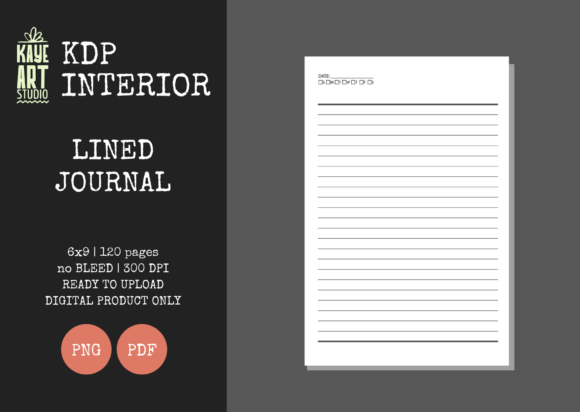
The primary value proposition of KDP Lined Journal 10 lies in its adherence to precise technical standards. When evaluating this asset, it is necessary to understand exactly what is included in the package to ensure compatibility with Amazon’s printing requirements. The template is configured with the following specifications:
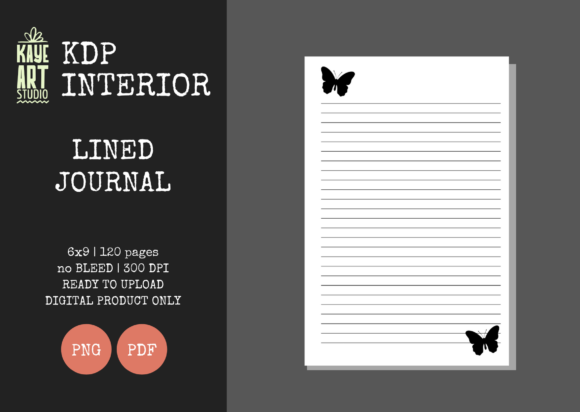
- Trim Size: 6×9 inches, the most versatile and popular size for trade paperbacks and journals.
- Bleed Settings: No Bleed. All content is contained within the safe zone margins.
- Page Count: 120 pages, offering a substantial writing surface without excessive spine width.
- Resolution: 300 DPI, ensuring crisp line definition during the printing process.
- File Formats: Available in both PNG and PDF to accommodate different workflow preferences.
A critical aspect of this evaluation is the confirmation that files have been tested on KDP. This pre-validation reduces the risk of rejection during the upload phase, which is a common pain point for new publishers. However, users must note that this listing is for the interior only. You are required to create your own cover separately, calculating the spine width based on the 120-page count and white paper stock. Failing to account for this separation between interior and cover assets can lead to formatting errors later in the process.
Strategic Fit: When to Use This Template
KDP Lined Journal 10 is not a universal solution for every low-content book. It serves specific use cases where efficiency and standardization are prioritized over complex customization. Evaluating whether this template fits your project requires analyzing your target audience and production capacity.
Ideal Scenarios for Implementation
This template is particularly effective for publishers who are scaling their operations. If you manage multiple niches—such as gratitude journaling, academic note-taking, or daily logging—the consistent 6×9 no-bleed format allows for rapid iteration. Because the line spacing and margins are pre-set, you can focus entirely on cover design and keyword research rather than adjusting gutter margins or line heights for every new title.
Furthermore, the 120-page count strikes a practical balance. It provides enough perceived value to justify a competitive price point while keeping printing costs low enough to maintain healthy royalty margins. For beginners testing a new niche, this lower page count minimizes financial risk compared to thicker 200+ page alternatives. The "No Bleed" setting also simplifies the design process, as there is no need to extend background elements to the edge of the page, reducing the likelihood of trimming errors.
Situations Requiring Alternatives
Conversely, KDP Lined Journal 10 may be insufficient for specialized markets. If your niche requires full-page illustrations, marginalia, or decorative borders that extend to the page edge, the "No Bleed" restriction will be a limiting factor. In such cases, a bleed-enabled template is necessary to achieve a professional aesthetic.
Additionally, certain demographics prefer different trim sizes. A 6×9 journal may feel too large for pocket-sized travel logs or too small for comprehensive academic textbooks. Publishers targeting these specific segments should seek templates formatted at 5×8 or 8.5×11 inches respectively. Finally, if your brand identity relies on unique line spacing (such as college-ruled vs. wide-ruled variations), you must verify that the line height in this specific template matches user expectations before purchasing.
Benefits and Tradeoffs Analysis
Making an informed decision involves weighing the operational efficiencies against potential limitations. The following analysis highlights the core tradeoffs associated with using this pre-made interior.
Operational Efficiency vs. Differentiation
The most significant benefit is time savings. Creating a 120-page document with perfect margins and 300 DPI resolution from scratch can take hours. KDP Lined Journal 10 eliminates this labor. However, this convenience comes with the tradeoff of ubiquity. Because many publishers utilize similar standard interiors, your book’s internal experience may be identical to competitors. To mitigate this, publishers must rely heavily on unique cover designs, compelling titles, and differentiated marketing angles to stand out in search results.
Format Flexibility vs. Standardization
The availability of both PNG and PDF formats offers flexibility for designers who wish to modify the interior in tools like Canva or Photoshop. While PDF is generally preferred for direct KDP upload due to smaller file sizes and vector-sharp text, having PNG options allows for easier manipulation if you intend to add custom headers, footers, or motivational quotes to specific pages. The tradeoff is that modifying a pre-made PNG interior negates some of the time-saving benefits. Users must decide upfront whether they intend to use the file "as-is" for maximum speed or modify it for greater uniqueness.
Practical Decision-Making Insights
Before integrating KDP Lined Journal 10 into your publishing workflow, consider the following practical checkpoints to ensure alignment with your business objectives.
- Verify Niche Expectations: Research the top-selling journals in your intended category. Check customer reviews specifically mentioning line spacing and page quality. If customers frequently complain about lines being too faint or too close together, inspect preview images of this template to ensure it resolves those complaints rather than replicating them.
- Cover Compatibility Check: Since you must create your own cover, calculate the exact spine width for 120 pages on white paper before designing. Ensure your cover designer understands that the interior is strictly 6×9 with no bleed, as mismatched dimensions are the leading cause of publication delays.
- Royalty Projection: Use the KDP Royalty Calculator with the 120-page count to determine your break-even point. Confirm that the fixed cost of this interior asset does not erode margins on what is typically a low-price-point product.
- Quality Assurance: Even though files are listed as tested, always order a physical proof or use the KDP Previewer tool before publishing. Screen resolution differs significantly from print output, and verifying line darkness at 300 DPI is crucial for user satisfaction.
Final Evaluation Considerations
KDP Lined Journal 10 serves as a functional utility for low-content publishers seeking a reliable, standard-compliant foundation. Its strengths lie in technical accuracy, appropriate page count for margin optimization, and format versatility. It is best suited for volume publishers, niche testers, and creators who prioritize cover design over interior complexity.
However, it is not a substitute for market research. The template solves the formatting problem but does not solve the demand problem. Success depends on pairing this standardized interior with validated niche selection and professional cover art. By understanding both the capabilities and the constraints of this specific asset, publishers can integrate it effectively into a sustainable KDP strategy, avoiding common pitfalls while maximizing production efficiency. Ultimately, the decision to use this template should be driven by a clear assessment of whether a standard 6×9 no-bleed lined format meets the specific needs of your target reader.