Work Day Organizer Planner: Evaluating a KDP Interior Template for 2022
For self-publishers and productivity enthusiasts navigating the low-content book market, finding a reliable interior template is often more challenging than designing a cover. The Work Day Organizer Planner serves as a foundational asset for those looking to publish functional stationery on Amazon KDP or create custom office supplies. Specifically, the 2022 Work Day Organizer Planner – KDP Interior offers a pre-structured layout designed to bridge the gap between digital design files and physical print products. Rather than being a consumer planner itself, this resource is a production tool aimed at creators who need a professional, tested starting point for their publishing business or personal organization system.
Understanding the distinction between a finished product and a source file is critical when evaluating this asset. This package provides the architectural blueprint for a 120-page organizer. It addresses common pain points in KDP publishing, such as margin errors, bleed settings, and resolution issues, by providing a validated PDF alongside editable source files. For professionals aged 20 to 50, including freelancers, educators, and small business owners, the value lies not just in the calendar dates, but in the workflow efficiency gained by using a pre-formatted, high-resolution template that adheres to strict printing standards.
Technical Specifications and Print Readiness
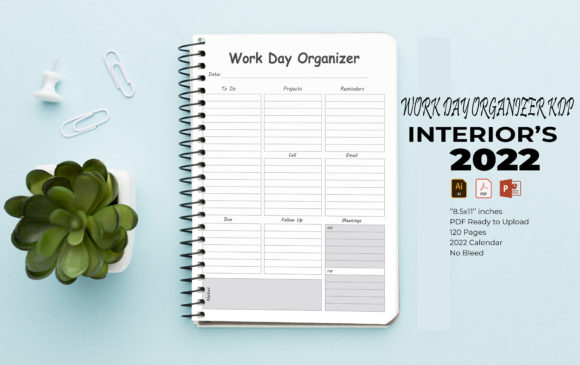
The primary metric for any KDP interior is technical compliance. A beautifully designed planner that fails Amazon’s automated review process is functionally useless. This Work Day Organizer Planner is engineered with specific constraints to mitigate rejection risks. The file size is set to the standard US Letter dimension of 8.5 x 11 inches, which remains one of the most popular trim sizes for professional organizers due to its ample writing space and compatibility with standard binders.
A significant advantage of this specific template is the "No Bleed" configuration. While full-bleed designs offer edge-to-edge graphics, they significantly increase the complexity of formatting and the likelihood of trimming errors during print-on-demand manufacturing. By utilizing a no-bleed layout with safe margins, this template ensures that content remains centered and legible regardless of minor mechanical shifts during the binding process. The included PDF is generated at 300 DPI, the industry standard for crisp text and sharp vector lines. Low-resolution interiors often result in pixelated text or grayish blacks, but the vector-based construction here ensures that lines remain mathematically precise at any zoom level or print size.
File Versatility and Editing Capabilities
Rigidity is the enemy of long-term utility in digital assets. A template that cannot be modified limits its lifespan to a single season. This organizer distinguishes itself through multi-format accessibility:
- Adobe Illustrator (AI/EPS): For designers comfortable with vector manipulation, the CC 2019 compatible files allow for deep customization. Users can adjust grid systems, modify typography, or rebrand the entire aesthetic without losing quality.
- Microsoft PowerPoint (PPT): This inclusion dramatically lowers the barrier to entry. Many entrepreneurs and educators possess PowerPoint proficiency but lack Adobe Creative Cloud subscriptions. The ability to edit layouts, change colors, and rearrange elements in a familiar interface makes this Work Day Organizer Planner accessible to non-designers.
- JPEG and PDF Assets: These serve as reference points or quick-use components for those who may only need to extract specific pages or visuals for other projects.
The presence of 100 resizable vector shapes is a practical feature for customization. Instead of drawing new icons or dividers from scratch, users can leverage these pre-made assets to maintain visual consistency while altering the page structure. This modularity supports the creation of derivative works, such as niche-specific planners for teachers, nurses, or real estate agents, without requiring advanced illustration skills.
Functional Design and User Experience
Beyond technical specs, a Work Day Organizer Planner must function effectively as a cognitive tool. The 2022 edition includes a dedicated annual calendar followed by structured daily or weekly layouts spanning 120 pages. In practical application, this page count strikes a balance between comprehensiveness and portability. A 300-page planner can become unwieldy and expensive to print, while a 60-page booklet often feels insubstantial. The 120-page format allows for approximately three to four months of intensive daily tracking or a full year of weekly overviews, depending on how the user configures the repeating templates.
The layout prioritizes utility over decoration. Effective work organizers require sufficient whitespace for handwriting, clear hierarchy between dates and tasks, and consistent alignment. Because this template uses fully editable vectors rather than rasterized images, the line weights remain consistent. This is crucial for user experience; faint lines can be hard to see, while overly thick lines consume valuable writing space. The default styling is generally neutral, which serves two purposes: it appeals to a broad demographic and provides a clean canvas for branding. Professionals creating client gifts or corporate internal tools will find the minimalist aesthetic easier to adapt than an overly stylized pre-made design.
Real-World Application Scenarios
Evaluating this template requires looking at specific use cases across different professional demographics:
KDP Publishers and Marketers: For those building a catalog of low-content books, speed to market is essential. Testing margins and formatting for every new release is time-consuming. Using this pre-tested Work Day Organizer Planner as a base allows publishers to focus on cover design and keyword strategy rather than interior mechanics. The ability to easily change colors enables the creation of multiple SKU variations (e.g., floral, minimalist, corporate) from a single source file.
Freelancers and Solopreneurs: Many independent professionals prefer physical planning but struggle to find commercial planners that fit their specific workflows. With the PPT or AI file, a freelancer can delete irrelevant sections and add project-specific trackers, billable hour logs, or content calendars. This transforms a generic organizer into a bespoke business management tool.
Educators and Administrators: School staff often require planners that align with academic terms rather than calendar years. The editable nature of this template allows for the removal of summer months or the addition of grading sheets and meeting notes sections. Printing these locally or via a print shop ensures the entire department has standardized, relevant tools.
Assessing Value and Limitations
While the 2022 Work Day Organizer Planner offers significant utility, prospective users should approach it with realistic expectations. The inclusion of the 2022 calendar means the dated portions are historically fixed. However, for KDP sellers, this actually presents an opportunity. Evergreen undated versions often outsell dated versions because they do not expire. Users can easily remove the specific 2022 calendar page and replace it with an undated future log or perpetual calendar, extending the asset's commercial viability indefinitely.
Another consideration is software versioning. The requirement for Illustrator CC 2019 or PowerPoint 2016 is generally safe for modern systems, but users with significantly older software may encounter compatibility warnings. Conversely, users with the latest versions should have no issues, though they should always save a backup copy before making extensive edits to preserve the original master file.
From a cost-benefit perspective, the time saved in formatting validates the investment. Creating a 120-page, margin-compliant, vector-based planner from scratch typically requires 20 to 40 hours of design and testing time for an intermediate user. Even for experienced designers, the mental load of ensuring KDP compliance can detract from creative efforts. This template functions as an infrastructure solution, outsourcing the technical risk so the user can focus on value-added customization.
Recommendations for Implementation
To maximize the effectiveness of this Work Day Organizer Planner, consider the following professional recommendations:
- Verify Before Publishing: Although the file is marketed as ready-to-upload, always run the final PDF through Amazon’s Previewer tool. Software updates or export setting changes can occasionally alter margins. A thirty-second verification step prevents days of rejection delays.
- Test Print Locally First: Before listing on KDP or ordering a bulk run from a print shop, print a sample on your home or office printer. Screen brightness can be deceptive regarding line weight and contrast. Physical proofing reveals whether the writing space is adequate and if the grayscale values reproduce clearly.
- Create a Master Template: Upon receiving the files, strip out the 2022-specific elements and create a generic "Master Work Day Organizer" file. Save this separately. Future projects can then be spawned from this evergreen master, ensuring you never accidentally publish outdated dates.
- Leverage Vector Scalability: If you plan to create smaller formats (e.g., 6x9 inch travel planners), use the AI/EPS file to resize artboards and vector elements simultaneously. Do not attempt to resize the PDF or JPEG, as this will degrade quality. True vector editing maintains crispness at any dimension.
Ultimately, the 2022 Work Day Organizer Planner – KDP Interior is best understood as a professional-grade component rather than a finished consumer good. Its strength lies in its adherence to printing standards, its multi-software compatibility, and its flexible vector architecture. For adults managing businesses, publishing portfolios, or complex personal schedules, it provides a reliable foundation that eliminates technical friction. Whether used to generate passive income through KDP or to streamline personal productivity through custom printing, its value is derived from the efficiency and quality it injects into the creation process.